 EasyTables · Tableau Viz Extension
Your Tableau data, in detail
Sort and filter a worksheet as a table. Group rows, build a pivot and compare periods. Viewers adapt the table themselves.
Your turn to explore
The actual EasyTables 1.41.1 engine, with a fixed sample dataset. No Tableau sign-in needed.
Search for a city, sort a column, or select numeric cells to see their totals. Export your result from the table footer.
Sample retail data · Work stays in this demo · Changing the starting view resets your edits
Swipe across the demo to reach more columns and controls.
Table controls inside your worksheet
Find, organize and share the result
Find what matters
Sort, search and filter columns. Pin identifiers, resize columns and choose which settings users can change.
Bring structure to detail
Build nested groups, subtotals and pivot layouts. Compare periods and highlight exceptions without leaving the view.
Keep the result readable
Set number formats, labels and conditional rules. Choose from five light themes and move author settings with JSON.
See it in action
One feature at a time
1 / 7

Hide detail, keep the totals
Hide City and Sub-Category in Fields, then apply. The table combines rows at the remaining level of detail and recalculates each measure.

Open a group to follow the detail
This row-only pivot expands Region and Category, or collapses them to compare subtotals. The grand total stays in view.

Build the comparison you need
Add Quantity to a pivot with Sales and Profit. Change rows, columns and measures through the actual field picker.

Make the numbers easier to read
Sales values sit below their bars in each cell. Change the decimals in Fields, with Profit sign rules alongside.

Two fields in one readable cell
Choose Region in Country’s Stack fields control. Each cell shows Country and Region on separate lines, while both fields remain part of the data.

Open the detail behind a row
The first country opens with a Sales and Profit line chart by city. Collapse it or open another row.

Give the table a different feel
Table settings opens directly on the built-in themes. Apply Warm Paper, or choose a personal theme in View options.
Swipe across an image to inspect the controls, or open it at full size.
Recorded in EasyTables 1.41.1 with the same fixed public sample as the live demo.
Installation
Start with a worksheet
EasyTables is a network-enabled Viz Extension. Add it through the worksheet's Marks card.
Download EasyTables.trexEasyTables is on Tableau Exchange. The listing installs the same extension as this manifest.
For your administrator
Exact extension URL from the manifest:
https://easy-tables.databeyond.app/This is the address to allow in Tableau. The .trex link above is the file you download, not the safe-list URL. Opening the extension address in a normal browser tab does not run the extension.
- Check the Tableau version
Use Tableau Desktop 2024.2 or later, Tableau Server 2024.2 or later, or Tableau Cloud. These are Tableau's published Viz Extensions platform requirements; they are not a claim that every version has been individually tested with EasyTables. Tableau compatibility.
- Allow the extension on Server or Cloud
The administrator opens Settings → Extensions, enables extensions for the site, and adds the exact extension URL shown here under Enable Specific Extensions. The current manifest requests Full Data Access; allow it after reviewing the extension and its data access. Published workbook/view permissions must also allow Download Summary Data.
- Start free on Server or Cloud
EasyTables Free covers up to 10 Tableau accounts a month with no time limit. On Tableau Server it starts with the first visit; on Tableau Cloud an author opens the workbook in Edit mode once, and EasyTables saves its code in the workbook. For more accounts, a buyer enters the licence key once on the activation page: on Tableau Server the licence then covers every workbook on that site; on Tableau Cloud an author adds the activation code to a workbook in one click. The common manifest does not change. Desktop authoring remains free.
- Load the downloaded manifest
Open a worksheet connected to your data. Expand the Marks card's mark-type menu, choose Add Extension → Access Local Viz Extensions, and open EasyTables.trex. Review the data-access prompt and allow it if approved by your organization. Tableau's installation steps.
- Add dimensions and measures
Drag dimension fields to Dimensions and numeric measures to Measures on the EasyTables Marks card. Rows reflect the worksheet's level of detail. Add the identifiers needed for the detail you want to show.
- Configure and save
Open the table's settings, configure columns, formatting, grouping or the default theme, then choose Apply. Save the Tableau workbook. Viewers can choose their own theme in View options; a Tableau Custom View can preserve it when the author configures a String parameter. To reuse a configuration, open Table settings → Transfer, export JSON, load it in the destination table, review any field warnings, and apply it.
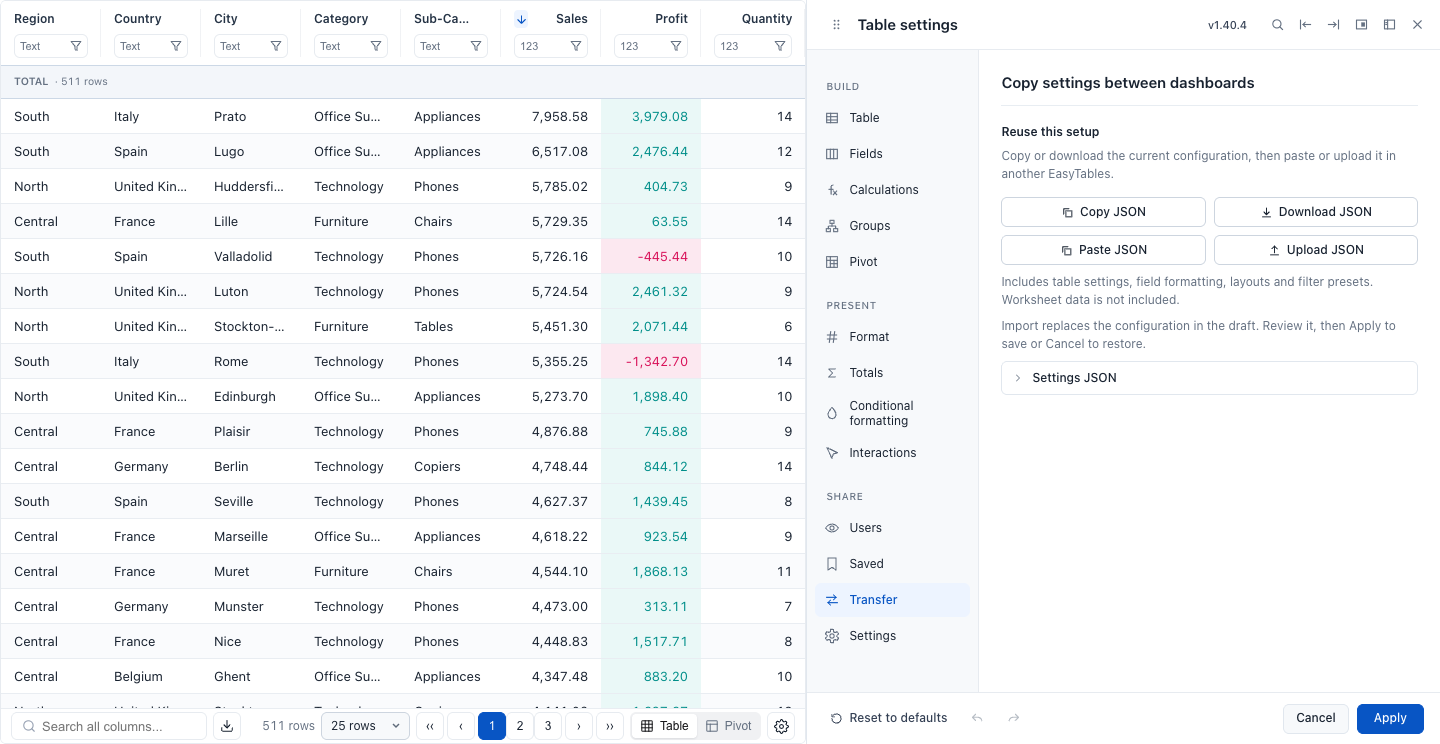
Move the configuration with JSON
The Transfer panel shown in EasyTables 1.40.4. Copy or download settings, load them into the destination table, review field warnings, and apply. View full size.
Plans
Start small, keep the same dashboards
EasyTables checks Tableau Server and Cloud access before reading worksheet data. EasyTables Free covers up to 10 accounts a month with no time limit and no payment card. Annual licences for more accounts are sold online through Lemon Squeezy.
EasyTables Free
Free for up to 10 accounts a month
No time limit, payment card or registration. It starts on its own: on Tableau Server with the first visit, on Tableau Cloud when an author opens the workbook in Edit mode once. Table settings and View options show this month's account count.
From the 11th account in a calendar month, EasyTables shows a purchase window until the next month begins. A paid licence removes the limit.
Install EasyTablesAnnual organization licence
$7average per Tableau account
per year
25 accounts$175 / year total, before tax
Marginal annual rates · select an example (25-account minimum)
Each lower rate applies only to accounts within its range. Choose the exact capacity you need in the estimate, with no forced packs.
Estimate for your teamOne common manifest works across plans. A licence is activated once for a Tableau address and site. Tableau Server workbooks on that site work without a code; on Tableau Cloud an author adds the activation code to each workbook in one click. Each site needs its own licence.
Plan your rollout
Annual price
Choose the Tableau account capacity you need. Opening more dashboards on an activated site does not create another licence. A paid licence does not count accounts, and there are no automatic overage charges.
Checkout runs on Lemon Squeezy and emails you a licence key. Enter it once on the EasyTables activation page with the Tableau address and site. The manifest itself stays the same.
For an invoice, contact us.
Licence and purchase information · EasyTables privacy · Refund policy
Data & privacy
Worksheet processing stays in your browser
EasyTables processes worksheet values in the browser and does not send them to the publisher's licensing service.
The extension reads summary data. Its manifest also requests Full Data permission for exact AVG, COUNTD and advanced pivot aggregation when Tableau's underlying-data APIs are available. Tableau controls data access.
Automatic Server/Cloud access checks send the observed Tableau context and address, the site when available, a saved activation code when present, and a one-way hash of the Tableau account ID, never the ID itself. For EasyTables Free the service keeps a keyed hash per month to count accounts. Retention periods and your rights are listed in the privacy notice. Desktop authoring has a local preview without these requests.
Author configuration is saved with the workbook. Optional user layout persistence uses an author-selected Tableau parameter.
Read the data categories and privacy details →Support
Setup, licensing or a difficult edge case
Email a concise description and your Tableau and EasyTables versions. Use synthetic data when sharing an example.
Contact supportDo I need a different file for a paid plan?
No. The common manifest stays in place. The buyer activates the Tableau address and site once with the licence key. Tableau Server workbooks on that site then work without a code; on Tableau Cloud an author adds the code to a workbook in one click.
Does a dashboard count as a licence?
No. Additional dashboards on an activated site use the same licence. Account capacity is the number of Tableau accounts you buy; a paid licence does not count or block individual viewers. EasyTables Free counts up to 10 accounts a month.
What happens if the current licence check fails?
An already granted decision can survive a temporary outage only until its original expiry, at most five minutes. Initial failure, denial or expiry blocks the table and export. Settings are preserved; retry when access returns.
Where can I find changes and installation details?
See the release notes, support page and Tableau's Viz Extensions documentation.